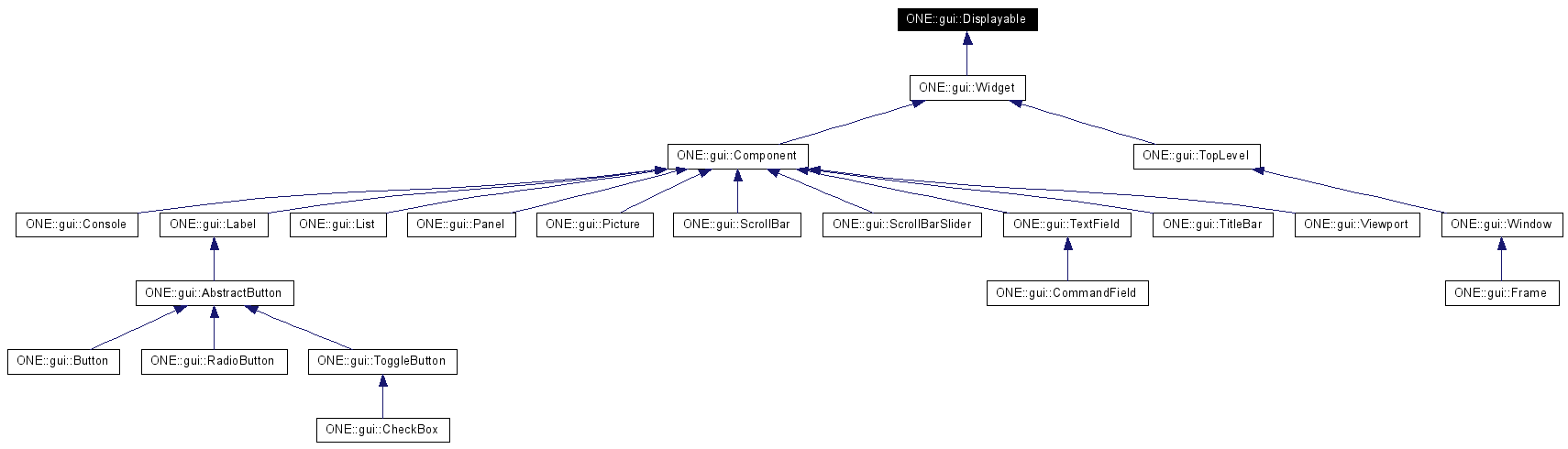
This class holds a bit string that may be used to efficiently store boolean properties and status flags. Great care must be taken to ensure that subclasses do not overwrite used bits.
Public Member Functions | |
| Displayable (bool vis=true) | |
| void | draw (Renderer2D *r, const int &x, const int &y, const int &w, const int &h) |
| draws a portion of this object | |
| void | draw (Renderer2D *) |
| draws this object. | |
| Color | getBackground () const |
| accesses the color that should be used to render the object's background. | |
| const Bounds & | getBounds () const |
| accesses this object's bounds | |
| const UIDSP & | getDelegate () const |
| virtual DelegateID | getDelegateID () const =0 |
| accesses the ID that identifies the object's UIDelegate type | |
| Color | getForeground () const |
| accesses the color that should be used to render the object's foreground. | |
| const Point & | getPosition () const |
| accesses this object's position | |
| virtual Size | getPreferredSize () const =0 |
| determines this object's preferred size. | |
| const Size & | getSize () const |
| accesses this object's size | |
| bool | isOpaque () const |
| checks this object's opacity | |
| virtual bool | isVisible () const |
| acesses the visibility property | |
| virtual void | layout ()=0 |
| lays out this component's internal elements | |
| void | scheduleLayout () |
schedules a call to layout | |
| void | setBackground (const Color &c, bool laf=true) |
| changes this object's background color | |
| void | setBounds (const int &x, const int &y, const int &w, const int &h) |
| void | setBounds (const Bounds &b) |
| changes this object's bounds | |
| void | setForeground (const Color &c, bool laf=true) |
| changes this object's foreground color | |
| void | setOpaque (bool o, bool laf=true) |
| changes this object's opacity | |
| void | setPosition (const int &x, const int &y) |
| void | setPosition (const Point &p) |
| changes this object's position | |
| void | setPreferredSize (const Size &s) |
| sets the object's preferred size | |
| void | setSize (const int &w, const int &h) |
| void | setSize (const Size &s) |
| changes this object's size | |
| virtual void | setVisible (bool vis) |
| changes this object's visibility | |
| virtual void | updateUI () |
| upates the ui according to the active LaF | |
| virtual | ~Displayable () |
Protected Types | |
| typedef unsigned int | bits |
Protected Member Functions | |
| virtual void | doDraw (Renderer2D *r, const int &x, const int &y, const int &w, const int &h)=0 |
| performs subclass-specific drawing | |
| bool | getBit (const bits &bit) const |
| void | setBit (const bits &bit, bool val) |
Protected Attributes | |
| Size | prefSize |
Static Protected Attributes | |
| static const bits | LSCHED |
| set when this object is scheduled to be laid out | |
| static const bits | OPQ |
| opacity bit | |
| static const bits | VIS |
| visibility bit | |
|
|
|
|
|
|
|
|
|
|
||||||||||||||||||||||||
|
performs subclass-specific drawing
Implementations of this function may assume that this object is visible and that
Implemented in ONE::gui::Console, ONE::gui::Frame, ONE::gui::Label, ONE::gui::List, ONE::gui::Panel, ONE::gui::Picture, ONE::gui::ScrollBar, ONE::gui::ScrollBarSlider, ONE::gui::TextField, ONE::gui::TitleBar, ONE::gui::Viewport, and ONE::gui::Window. |
|
||||||||||||||||||||||||
|
draws a portion of this object
This function calls
|
|
|
draws this object.
This function calls |
|
|
accesses the color that should be used to render the object's background.
|
|
|
|
|
|
accesses this object's bounds
The
|
|
|
|
|
|
accesses the ID that identifies the object's UIDelegate type
Subclasses of this class must override this function in order to receive a proper delegate. See
Implemented in ONE::gui::Button, ONE::gui::CheckBox, ONE::gui::Console, ONE::gui::Frame, ONE::gui::Label, ONE::gui::List, ONE::gui::Panel, ONE::gui::Picture, ONE::gui::RadioButton, ONE::gui::ScrollBar, ONE::gui::ScrollBarSlider, ONE::gui::TextField, ONE::gui::TitleBar, ONE::gui::ToggleButton, ONE::gui::Viewport, and ONE::gui::Window. |
|
|
accesses the color that should be used to render the object's foreground.
|
|
|
accesses this object's position
|
|
|
determines this object's preferred size.
If this object has a non-degenerate preferred size (i.e. Implemented in ONE::gui::Console, ONE::gui::Frame, ONE::gui::Label, ONE::gui::List, ONE::gui::Panel, ONE::gui::Picture, ONE::gui::ScrollBar, ONE::gui::ScrollBarSlider, ONE::gui::TextField, ONE::gui::TitleBar, ONE::gui::Viewport, and ONE::gui::Window. |
|
|
accesses this object's size
|
|
|
checks this object's opacity objects that are set to not opaque (i.e. transparent) should not draw their background display.
|
|
|
acesses the visibility property
The default value is
|
|
|
lays out this component's internal elements
This function may not change this object's bounds. Implementations should lay out their internal elements according to the currently set bounds. Implemented in ONE::gui::Console, ONE::gui::Frame, ONE::gui::Label, ONE::gui::List, ONE::gui::Panel, ONE::gui::Picture, ONE::gui::ScrollBar, ONE::gui::ScrollBarSlider, ONE::gui::TextField, ONE::gui::TitleBar, ONE::gui::Viewport, and ONE::gui::Window. |
|
|
schedules a call to
This function makes component layout more efficient as several calls to this function within one frame duration result in only one call to |
|
||||||||||||
|
changes this object's background color
The setting is active immediately. If
|
|
||||||||||||
|
|
|
||||||||||||||||||||
|
|
|
|
changes this object's bounds
See
|
|
||||||||||||
|
changes this object's foreground color
The setting is active immediately. If
|
|
||||||||||||
|
changes this object's opacity
The setting is active immediately. If
|
|
||||||||||||
|
|
|
|
changes this object's position Note that this function does not request a re-layout.
|
|
|
sets the object's preferred size If the value is set to an empty size object, the component will calculate its preferred size.
|
|
||||||||||||
|
|
|
|
changes this object's size Note that this function does not request a re-layout.
|
|
|
changes this object's visibility objects that are set to invisible will not be drawn. Note that although this does not explicitly disable user input, invisible objects are usually excluded from event multicasts.
Reimplemented in ONE::gui::Widget. |
|
|
upates the ui according to the active LaF
The default implementation updates the Reimplemented in ONE::gui::AbstractButton, ONE::gui::CheckBox, ONE::gui::CommandField, ONE::gui::Console, ONE::gui::Frame, ONE::gui::Label, ONE::gui::List, ONE::gui::Panel, ONE::gui::RadioButton, ONE::gui::ScrollBar, ONE::gui::TextField, ONE::gui::TitleBar, ONE::gui::Viewport, ONE::gui::Widget, and ONE::gui::Window. |
|
|
set when this object is scheduled to be laid out
|
|
|
opacity bit
|
|
|
|
|
|
visibility bit
|
 1.4.3
1.4.3